OTHER
IMPORTANT SUBJECTS - COVERED IN DEPTH
Unsolicited
Email (Spam) Complaints:
No
matter how many precautions you may take, such as requiring your subscribers to
"double opt-in", you will receive some spam complaints. These can be
from people that simply forgot they did in fact request to receive your ezine,
or product information, and upon receipt of your email, view it as outright spam.
It
is very important that you keep a copy of every single "subscribe me"
request that you receive. I think a lot of companies include this notice at the
end of the email they send out, but may not in fact actually have the original
request on file. Always keep these, because you'll never know when you will need
them!
If
someone who opted in to your mailing list sends a spam complaint to an organization
like Spam Cop, what happens is this:
Spam
Cop requires that the person first sign up with them, for a free account, if they
aren't a member already. Once the person has signed up, they can report the spam
in one of two ways.
They
can use the form provided on the spam cop website, or, send the offending email,
with FULL headers, to spamcop@spamcop.net
I
believe at that point (having never used Spam Cop personally) Spam
Cop sends them back a reply email, which allows them to add some comments to the
complaint such as "I did subscribe to this ezine, but my repeated attempts
to unsubcribe were ignored", or, "I never asked to receive this information
from xxx company". When they've completed the form, and have pasted in both
the FULL email headers, and the body of the message, they send it back to Spam
Cop, so they can start to take action on behalf of the recipient.
When
managing your online business, you probably won't have time to report all the
junk mail you will receive as spam. It's much easier to send the unread letter
straight to the trash!
Since
most spam contains a URL for a company offering products or services, what Spam
Cop does is goes to that domain, and scours the site, for any email addresses
or domain names they can find. (I am not entirely sure if that is correct, but
I believe that is how it works.)
They
look for things such as hosting company URLS, payment processing company urls,
autoresponder services, and anything else they can find, for companies that are
providing the alleged spammer with a service.
Once
they've found that, they then send an email to all the service providers, indicating
that their customer is sending unsolicited email.
This
prompts the service providers to contact your company, with a letter similar to
this:
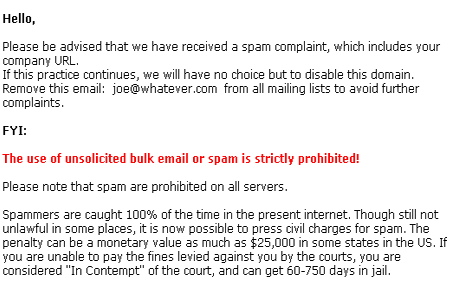
When you receive a notice of this nature, you must act on it immediately.
Find
the original "subscribe me" request by searching on the email address
for the alleged spam recipient, and AFTER you have removed the person from every
single mailing list you have, then send a reply email to Spam Cop, AND your service
providers, which includes the notice of removal, and a copy of the original subscribe
request.
Indicate
the person did in fact opt in, or ask to receive your information, and
you have provided proof. Also tell them that the person has been removed from
your mailing list.
Obviously
when your hosting company is threatening to shut you down, it is not good for
business. If your hosting company receives too many complaints against you, they
will shut down your account!
Once
your hosting account is terminated, you won't even be able to access your FTP
server, and none of your customers will be able to access your site. If your autoresponder
service shuts you down, you lose your customer list. If your payment processing
system shuts you down, you won't even be able to take orders once you have moved
your domain. In some cases, the hosting company will charge you a "clean
up" fee, for clearing off your server.
IF
YOU OPERATE YOUR OWN RESELLER PROGRAM, THE CHANCE OF RECEIVING SPAM COMPLAINTS
IS MUCH, MUCH HIGHER!
If
you already have, or are creating your company Reseller Program, make sure you
include something similar to the following, in the Reseller Program Agreement
which should be required reading prior to anyone joining.
No
Spamming:
As
an affiliate member, please be aware that promoting our products, or company name
via unsolicited email is absolutely forbidden. This also includes posting to Newsgroups,
and the use of FFA (Free for all) pages, in ANY manner.
Breaking this agreement will result in the termination of your account, and any,
or all commissions owing will be withheld.
Of
course you may word your agreement in any way you like, and the above noted is
simply a sample notice.
What
happens if your affiliate member is accused of spamming?
If
a member of your affiliate program is accused of spamming, the circumstances surrounding
the issue will be pretty much the same as if you had done it yourself.
Your
hosting company doesn't care whether or not it was you, or one of your affiliate
members. The fact remains that the domain name included with the spam letter is
hosted on their server.
They
will send you a warning, similar to this:
Please
advise your customer that spamming is not allowed on our network. If your customer
continues with this practice we won't have any other choice but to disable the
domain.
When
you receive a spam complaint, regarding unsolicited email being sent out by one
of your resellers, here is what you have to do:
If
the complaint was sent from Spam Cop, you should contact all service providers
included in the complaint, and inform them that you are taking immediate action
in this regard. Explain to them that the person is a reseller for your company,
and that you will fully investigate and deal with the problem right away.
If
the spam complaint was forwarded by the actual email recipient, and not done on
behalf of any anti-spam organization, then you must contact that person, and inform
them that spamming is not permitted by your company, and that you are taking immediate
action against the offender. Assure them that you will do everything you can to
prevent their receiving any further email from this person, and that, as a result
of their actions, their reseller priveleges may be revoked.
IF
the person that forwarded the spam to your company did NOT include the full email
headers, you must email them back, and ask them to forward the email again, with
the full headers intact. You may need them to help identify the spammer.
Once
you have the original spam letter in your possession, you should read it thoroughly
to make sure it was definitely sent unsolicited.
Included
in the body of the letter will either be the actual reseller URL, or a domain
name of their own, which
leads to a site that DOES contain the reseller URL.
Many
people that purposely spam others don't include their reseller link in the body
of the email. They use a "fly by night" domain, that they get for free,
and on that site, you will usually find a redirect script that hides their actual
URL.
Because
many redirect scripts change the page very quickly, you only have a few seconds
to get to view the source code, which WILL contain their Reseller ID number.
Here's
what you do.
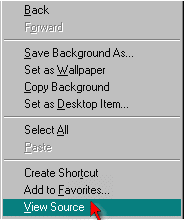
Click
the link in the body of the unsolicited email, and immediately once the page starts
opening in your browser window, get ready to RIGHT CLICK and click on "VIEW
SOURCE", from the drop down menu, like this:
If
you're not fast enough, and the page redirects too fast, just try it again, until
you get it.
Once
the source code opens up, you can then scan through it, for the URL, and ID number
of the reseller. If the page contains a lot of code, you won't want to bother
reading the entire thing, looking for the Reseller URL, so it's much easier to
use the SEARCH function in Notepad, and search for your domain name.
Once
you click FIND it, any reference to your URL will be highlighted in the source
code. When you find the URL, simply look for the specific reseller ID number,
as shown below.

When
you have the ID number, check your adminstration area, to find the Resellers name,
and email address.
Then,
send them an email, similar to this:
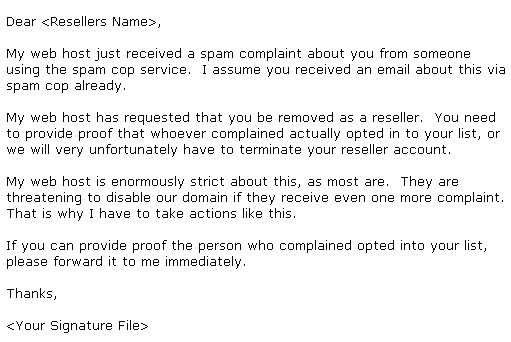
If
the person is not able to provide proof that the spam recipient asked to receive
that information from them, then you will have to disable their reseller account,
and inform them of this, by email.
If
they are able to provide proof, you must forward that to the person who complained,
and, if they used Spam Cop, or something similar, send them a copy too, with an
explanation that the email was not spam.
If
your policy is to withhold reseller commissions in a case like this, make sure
to inform whoever takes care of paying your resellers, and inform them NOT to
pay on this account.
The
AssocTrac software is really great to have in this case, as it allows you to DISABLE
a reseller account with the click of a mouse button, and include a note, as to
the reason why. Then, all you have to do is contact whoever takes care of paying
your resellers, and tell them to watch for DISABLED accounts, prior to creating
checks for that month.