
FREQUENTLY ASKED QUESTIONS
TO YOUR MOST COMMON PURCHASE PROBLEMS
IF YOU ARE PAYING BY CREDIT CARD, READ THIS:
When you are entering your credit card information, DO NOT use any spaces, or dashes in the card number, like this:
1234-5678 or this 1234 5678
You MUST enter your card information in one long string of numbers, as shown in the example below:
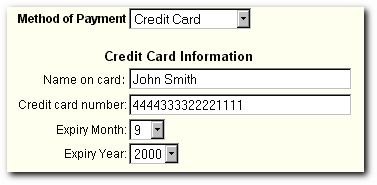
Then, check to make sure you have chosen "Credit Card" as your METHOD OF PAYMENT. Make sure your expiry date is also correct, then complete the rest of the order form.
If you receive an error message after submitting your order, DO NOT ENTER YOUR CREDIT CARD INFORMATION AGAIN.
INSTEAD,
CONTACT US FOR FURTHER ASSISTANCE!
support@amazingformula.com
IF YOU ARE PAYING BY ELECTRONIC CHECK, READ THIS:
The most common problem when paying via electronic check is that the "METHOD OF PAYMENT" has NOT been chosen correctly.
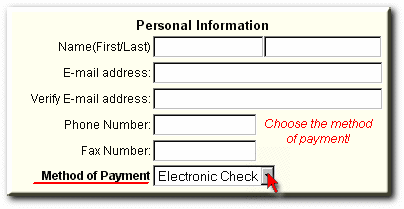
When paying by check, you must be sure to check the box showing above, and choose "Electronic Check".
It is pre-set to "Credit Card", so unless you change it to Electronic Check, your order will be denied!
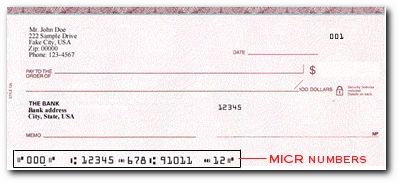
The second most common problem is that the MICR number has NOT been entered correctly.
THE MICR NUMBERS are the routing/transit number, checking account number, check number at the bottom of the check.
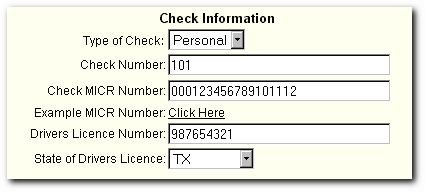
This is how the Electronic Checking section of the order form should look when it has been completed correctly:
If, after following the instructions, your problem persists, please contact us using the support information below.
If
your ordering problems persist, or you are in need of additional assistance, contact
us at:
http://www.amazingformula.com/support
Or, click below to request a chat with our support staff, or to leave an email message for us.
© Higher Response Marketing, Inc. All rights reserved.