6:20
AM: Open
Eudora (or your preferred email program), and start the download of any new mail.
Start with your own personal mailbox. This is where you will find responses
from customers, who you have already corresponded with, that may have additional
questions, or problems. These are the most important messages you will receive
in the morning!
Ideally
you should have your own personal email address, such as you@yourcompany.com,
one for support, such as support@yourcompany.com and any other accounts you deem
necessary. When you reply to a support request, the return address will be your
personal one.
Depending
on how your company is set up, you will also have many other email addresses as
well.
How
to know which email addresses you may need:
No
matter what you are selling online, you will definitely want to have a info@yourcompanyname.com
email address. All general inquiries from your visitors should be directed there.
This should be the main email address displayed on your web site.
If
there is more than one person working with you, they will each need their own
name@yourcompany.com address, as will you. When sending mail back and forth to
everyone in your company, you won't want them all going to support@ or service@.
 Whatever you do, do not use a web based email address, such as companyname@yahoo.com.
It looks really unprofessional. It's also very difficult to provide email support
through the Yahoo web site. Although you can set your default mail program to
download your @yahoo email, and work through their, you won't want to rely on
their service to get your business done.
Whatever you do, do not use a web based email address, such as companyname@yahoo.com.
It looks really unprofessional. It's also very difficult to provide email support
through the Yahoo web site. Although you can set your default mail program to
download your @yahoo email, and work through their, you won't want to rely on
their service to get your business done.
If
you offer a service specific to customers only, you can use the address of: service@yourcompany.com
address, however support@ will always usually suffice.
Make
sure that you provide the support@ email address to your customers only, so their
email isn't mixed in with general inquiries. By far, providing support to your
existing customers should be the most important thing. Of course you can't delay
responding to new inquiries, but definitely download the support mail before the
general inquiries.
You can probably set up as many email addresses as you want/need, with your hosting
company, as most of them provide you with unlimited aliases.
Many
of the email letters you will receive each day, sent to any of the email addresses
that you have will be unsolicited spam letters, but you can never be sure, so
you must open each one manually, and scan through it quickly unless it's glaringly
obvious, such as "MAKE $40,000 IN TEN DAYS - GUARANTEED". Those can
be automatically deleted upon sight!
Don't
attempt to request to be removed from unsolicited email letters of that nature.
Chances are that you'll never hear from them again after the first letter, however,
if you actually click the "Reply" button and asked to be removed, they'll
know there is a live person at that email address, and you will surely receive
a lot more email from them in the future. Any links found that say you should
click on them to become removed are usually always fake, so don't bother yourself.
It's quicker to delete them. If you are using Outlook or Outlook Express, I believe
you can use the "Block Sender" feature, so they can't contact you again,
but definitely make sure the mail isn't from a customer first.
Start with the first unread message in your mailbox, and use the "down"
arrow in Eudora, to move your way through the messages. Every time you click the
down arrow, the next message in your mailbox appears on your screen. You can toss
any spam letters into the mailbox very easily with this system, and it prevents
you from having to manually double click each message open.

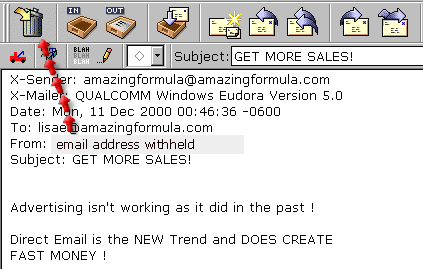
The
red arrow above shows how to use the toolbar's down arrow, to scroll through the
mail. While doing so, any letters that need trashing are easily dumped into the
trash, by clicking the Trash Can image on the top left of the toolbar, while the
message is open, like this:
If
you come across an email that needs a response, simply click the reply button,
and start typing. Now, of course the message the person wrote to you must be included
in the response, so they know what the original conversation was. Do not just
assume that the person will know why you are emailing them. You must quote the
original message.