ISSUING
CUSTOMER REFUND REQUESTS:
When
you receive an email from a customer, that requests a refund, process it immediately!
Do
not wait, thinking that you'll do it later, because if you do wait, you may forget
about it altogether. It will then go from a simple refund, to a complicated chargeback,
and you really don't want that to happen.
Depending
on which type of payment processing system you are using, it should be really
easy to process a refund. You should NOT need to request that the customer provide
you with his/her credit card number, unless the purchase was a very long time
ago, as in nine, or ten months!
When
you process a refund, it is a very good idea to keep a copy of the transaction
receipt, in a .doc file, which is of course saved to a floppy disk, and/or burned
onto a CDROM for future use. Since the refund confirm won't contain their credit
card number, it's safe to store them on your system.
 You never know when you may need to provide proof of a refund, so keep a copy
of it, for as long as you can. There are many other things that you'll need to
hang on to, and those are covered in depth, in another section.
You never know when you may need to provide proof of a refund, so keep a copy
of it, for as long as you can. There are many other things that you'll need to
hang on to, and those are covered in depth, in another section.
You
may want to name the .doc file: (Insert Month) Refunds.doc
or something that easily indicates which month is associated with the file. It's
a good idea to use a separate one, for each month. It saves having to dig through
one long file, to find proof of a refund, months later.
Also,
if you process a manual charge for a telephone order, keep a copy of that too.
If you don't and you need to process a refund for that person, you will need their
transaction ID, and that may be the only place you can find it!
Depending
on which type of payment processing system you use, it may be quite easy to process
a refund. Verisign/Signio allows us to search transactions by day, and process
a quick credit.
All
we have to do is find the original purchase order, (which we copy, and paste into
the .doc file) then going by the Transaction ID, we do an "auto credit".

Once
the credit has been done, we take the confirmation message, and paste that into
the .doc file, right underneath the original transaction information.

If
you are not be able to issue an "auto credit", you might be able to
do the refund, using the TRANSACTION ID number alone. If that isn't an option
with your payment processing system, you wil then have to enter the customers
credit card number, expiry date, name, address, phone number, etc.
If
that is the case, it will take considerably longer to process the refund, because
you'll have to locate, or request all that information first.
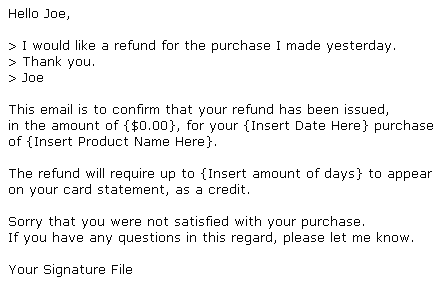
Once
the refund has been processed, you MUST immediately email the customer. Here is
an example of what to say, to inform them their refund has been processed:
Right
after the refund has been processed, the results recorded, and you have emailed
the customer with confirmation, the next thing you want to do is DISABLE the password
they were given. Doing so will ensure they are no longer able to access the product,
or the product download site, since they've been refunded, which is very fair.
If someone requests a refund, because they are truly unhappy with their purchase,
they won't be using it any longer, and won't need a working password.
There
will always be a handful of people that are happy with the purchase, and will
be using the product, but do request a refund. Simply process those requests,
as you would any other. There is nothing you can do. However, if you have someone
that buys a product, and immediately requests a refund, then buys another product
from you, and does the same thing, you may have to deal with them in a different
manner.
This
subject of what to do regarding many consecutive refund requests is covered in
another section, in detail.
In
most cases, you can have someone set up an "admin" section for you,
where you can issue passwords, change passwords, and disable passwords. You pretty
much can't get by without it if your customer have to login to a web site to receive
their product from you, so check with your webmaster, or programmer and see if
they can create a login admin area for you to use.