Many
people do NOT craft email responses very well simply because they don't know what
is, or isn't acceptable. They will click reply, and start typing at the bottom
of the email. This is NOT correct. Don't make the customer scroll through their
entire original message, to find your response at the bottom. It's rather unprofessional.
We
have provided numerous screen shots below, to show you how to take an incoming
email message, and respond to it, properly.
Here
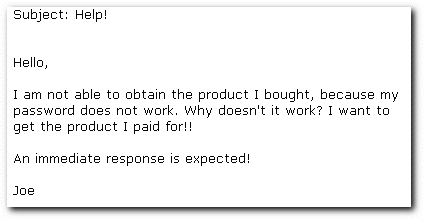
is an example email, which you will receive quite frequently. Many people are
wary of buying products online, especially from a company that is new to them,
therefore, when they receive a password that they can't get to work, they usually
panic thinking they've been scammed, and send a letter quite similar to the one
below.
As
you can see from above, this person provided NO information that will be helpful
to you, in quickly resolving their problem. They are upset, and want an immediate
response, but failed to provide helpful information, that may enable to you to
assist them, without having to spend time figuring out:
- Who they are
- What product
they bought
- What their login
information is
- What login link
they were using
- What exactly
happened when they tried to login
Few
customers provide information, so you must look it up, and then respond, as fast
as you can, with assistance. If you sell more than one product, you need to know
which one they bought, before you can help them. Don't rely on the customer to
provide this information, and unless it can't be helped, don't be lazy, and email
them back asking them to provide it. If they've already bought something from
your company, you should know exactly what that was!
At
this time, we do not know who this person is. His name is Joe. That is all we
know. So, we take his email address (joe@whatever.com), and use our FIND function
in Eudora, to get a copy of his Order Confirmation, or any other past correspondence,
which WILL provide the info we need, to proceed.
 Make sure your order form is set up to send you a copy of all purchase confirmations.
You WILL need them in the future, for a situation like this. Because we receive
an email notification each time a customer buys a product, we have a product purchase
history for everyone, and we use this all the time!
Make sure your order form is set up to send you a copy of all purchase confirmations.
You WILL need them in the future, for a situation like this. Because we receive
an email notification each time a customer buys a product, we have a product purchase
history for everyone, and we use this all the time!
Here
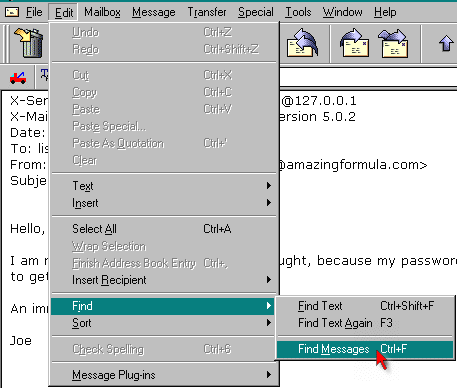
is how to use the FIND function.
1)
Click on EDIT, then from the list choose "FIND", as shown below:
Once
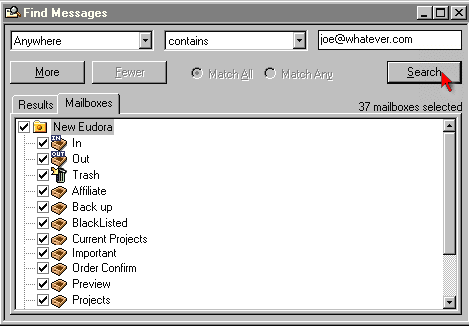
you have clicked "FIND MESSAGES", you will see something similar to
the following.
You
must select the mailboxes where you think any helpful correspondence will be,
(or just select the first checkbox, to search all accounts), then, type your search
keywords into the space on the top right hand side.
For
our example, we will search on Joe's email address, because that is all the info
we have to use. I really wouldn't want to search on "Joe", because there
will be too many results found.
Once
you've entered your search keywords, you can then click "Search", as
shown above.
If
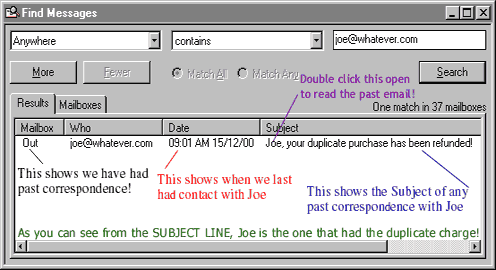
any results are found, it will bring them up, in the window, like this:
The
results will be displayed in the box showing above. You can see that an outgoing
letter was sent to this person in the past, in regards to a duplicate charge.
In
real life, I would have much more past email than this, such as the "Order
Confirmation", their "forwarded mail" indicating they've been added
to our autoresponder, and much more. For our example, we are showing only one
past contact, but there are really much more than that.
If you're using the GetResponse autoresponder system, you can change the settings
so that you receive a single report from each person that emails your responder
address, or daily/weekly report of the same. We use the single report, so as soon
as Joe's order went through, we know it, because the order form is set to forward
the letter to the responder adding them to the sequence, which then sends a copy
to us!
More
on the use of autoresponders is provided later!
The
old email we managed to find in Eudora tells us that Joe bought one of our products,
but was accidentally double billed. Since the letter we found is my response to
him regarding the duplicate order he accidentally processed, it says inside which
product he bought, and the date his order was processed because when I originally
emailed him, I ADDED that information there, on purpose.
The
reason for including that information in a reply is twofold. First, Joe receives
an email telling him his purchase of XXX , on XX date was refunded in the amount
of $XX. Since the letter went through the outbox, we have a copy of it there,
forever.
Now
that we have the name of the product Joe bought, I can then search our password
files, and locate his login information!
Once
we have his password, we can test it for errors, and either help him login with
what he was originally issued, or provide him with a new one. (Usually it's always
easier to provide a new one, especially if the first one was difficult to enter.)
If you have a password protected site, and are issuing a unique password to everyone,
make sure to program it, so that no lowercase "i" or "l" are
used.
Additionally,
if the person is reading their email with Arial fonts, the i's and l's look very
much the same. The same rule goes for the number 0, or the letter O. Don't use
those characters, and you will prevent a lot of login problems! Your
programmer should be able to deny those characters from being issued!