7:15
AM: Finish responding to any email that has not been dealt with as
this time. Don't leave any over "for later". You'll never fully catch
up! Depending on how much email you receive, and how fast you type, it may take
you hours to finish all of it, especially if a long, and detailed response is
required.
If
you sell a lot of products, you're going to have a lot of customer support, but
there are certain things you can do to cut that time down, and we cover some of
those in another section.
8:30
AM: Check for order problems, duplicate orders,
or any orders that seem questionable from the day before that you have not already
dealt with by email. This is done by logging into your payment processing system,
and requesting a report for the previous day's transactions. (Ideally you should
do this multiple times during the day as well, to catch any problem orders shortly
before, or after they occur.)
If
you see someone who had a problem placing their order, such as someone who tried
to order by credit card, or electronic check, but was declined, you should email
them, or call them if they are located in the US, or Canada. If they are overseas,
use email.
If
you see someone who did have a problem placing their order, and you think that
you can provide helpful information to solve their problem, send them an email
similar to this:
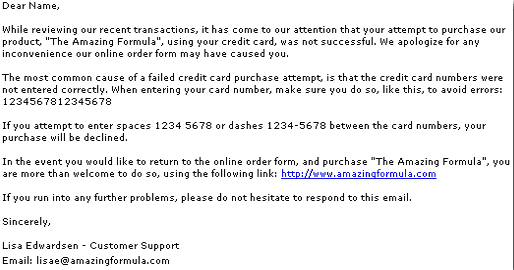
The
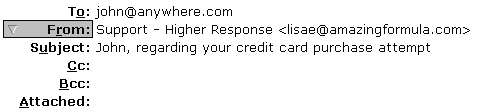
subject line of that email should explain clearly as to what the message is about,
like this:
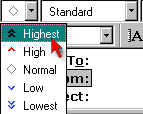
If
you like, you can send that high priority, by marking it with the PRIORITY function
in Eudora, like this:
 The email written to assist the customer in overcoming their ordering problems
should be saved as "Stationary", as with any email that you frequently
write, over and over again. That way, you can use it again in the future.
The email written to assist the customer in overcoming their ordering problems
should be saved as "Stationary", as with any email that you frequently
write, over and over again. That way, you can use it again in the future.
The
subject of Stationary, and canned responses is covered in another section.
If
you find a DUPLICATE ORDER
in the last day's transactions, you can safely assume it was NOT
done intentionally by the customer.
You
MUST REFUND THIS PURCHASE IMMEDIATELY, and contact the customer to inform them
that you have:
- Found a duplicate
purchase
- Have refunded
the purchase
This
is what a duplicate order usually looks like if you use the payment processing
services provided by Verisign:

Naturally
the names and information above are not real, but it gives you a pretty good idea
of how to instantly spot a duplicate charge. In most cases, the duplicate charges
are right after one another, or so close, that you can see them by viewing the
same day's transactions. Keep in mind that just because you can't see a duplicate
charge, like the one above doesn't mean one hasn't occurred.
The
customer may have placed their order at 11:59 PM, and then again at 12:02 AM,
which would technically be two separate days. Make sure to always take note of
your orders each day, and you shouldn't have a problem, providing no glitches
in service have occurred to prevent you from seeing all transactions.
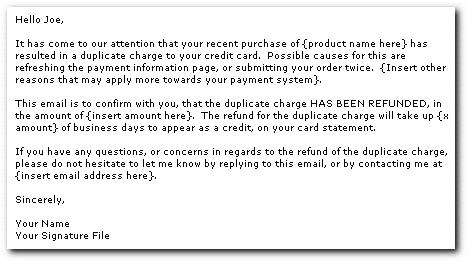
After
processing a refund, for a duplicate purchase, you need to send the customer an
email, which says something like this:
Depending
on the email program you are using, you may even be able to request a "Return
Receipt" so the customer can confirm with you that they have received your
letter, and are aware that the charge has been refunded to their credit card.
A
return receipt is an email that is included along with your letter, that asks
someone to reply back, to confirm that they have received it. When the customer
has read your email, and clicks to close the message, a box appears, asking them
to confirm they received the message!
(This
is especially great for refund confirmations, or duplicate charge notifications!)
Here
is an example of a "Return Receipt" request:
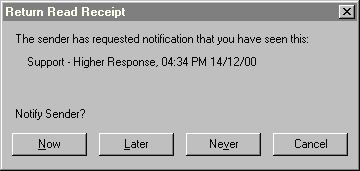
The
customer can choose to NEVER confirm receipt, and there is nothing you can do
about it, but for the most part, they usually do click "NOW", or "LATER"
in which case, you do get confirmation back.
If
you use Eudora Pro, you will have this option. I believe it is available with
Microsoft Outlook, since it IS an option with Outlook Express.
NOTE:
Not all email programs are capable of handling this request. Eudora allows you
to request them, and also be a recipient of them, but not all programs will show
the customer the request. I believe web based email may not accommodate them either.