|
Step Three is to download the "Automation Secrets" ebook.
Downloading the Automation Secrets ebook is no different than completing any other download.
All you need to do is click the link on the main page under the "step 3" section that looks like this example:

Once you click the link, the download of the "automation.ebk" file will start automatically.
All you need to do is choose to "SAVE" the file when you see the following window appear on your screen:
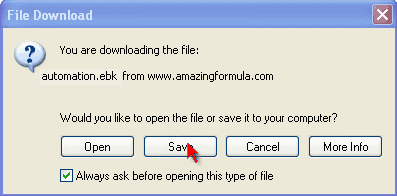
When the "Save" button has been clicked, you then need to choose where on your hard drive (your computer) you want to save the file.
A window that looks similar to this will appear:
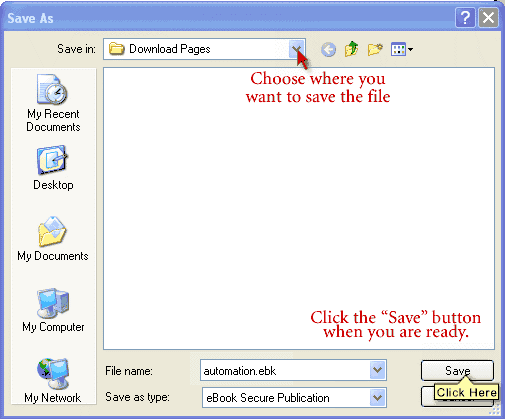
Once the download is finished all you need to do is remember where you saved the file, then go there and locate the "automation.ebk" icon and then double click it open.
When you are ready to complete the download, click here to go back to the main page and go through the instructions for step 3. When you are done downloading, return here if you need help registering the ebook.
HOW TO REGISTER THE EBOOK:
For further instruction on REGISTERING THE EBOOK - which is a necessary step, read on...
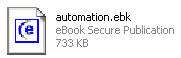
At this point you should have the "automation.ebk" file downloaded and ready to open.
The icon that you need to look for looks like this:
You will need your "Username" and "Registration Code" before you can proceed. This is the SAME username and password that you were issued to gain access to this page.
Get that information ready, then double click the "automation.ebk" file open.
Before you can click on any links in the table of contents, you'll need to register the publication.
Just click the first link on the Table of Contents and you'll immediately be prompted to register!
A window that looks exactly like this one will open right up:
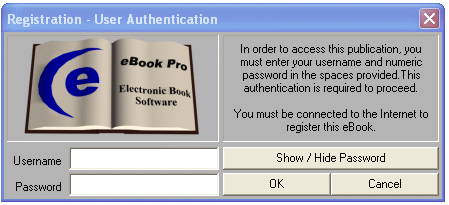
All you need to do is enter the "Username" that you were provided, then the "Password" you were provided and click the OK button.
NOTE: On the right hand side of the window you'll see the "Show/Hide Password" button. This is really cool because you can click it to see exactly what you are entering for the password.
Instead of the usual ******* that you see when typing a password, you'll be able to see the numbers you enter.
You also need to be connected to the internet to register the ebook.
Once you have registered your ebook, you're done!
You can then click any links to start reading.
|