
>>>ATTENTION: If you sell a product, service, coaching, local business services, advertising, life coaching, consulting, seminars, workshops, online training, membership sites, ebooks, or digitally delivered goods, this could be critical information -- please read this immediately for time sensitive information... <<<
My Amazing Freaking Formula
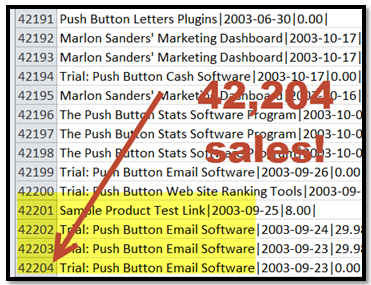
Has Sold 42,204 products
in
72 countries
"Your products sell like crazy
-- or I'll triple your money back"
Dear Internet Friend,
It's crazy.
I stumbled across a very simple formula that sells products like crazy. If you're interested in selling your products by the hundreds or even thousands, listen up:
On the Internet, it's tough to know who to believe. There are so many people making ridiculous claims, it's insane. It's like day after day, you get hit with hype pitch after hype pitch. In a moment, I'll tell you specifically what I can do for you. But first, here is why you should believe me to begin with:
HERE ARE 4 GOOD REASONS TO BELIEVE WHAT I SAY
|
I'm NOT going to promise you can make $50,000 a year or a month or $2,000 a day. That's total hype. I don't know you, your skills nor your background. How could I guarantee such a thing? |
|
Several thousand people have paid $3,000 to hear me present my formula at one-day seminars. Listen, people don't pay 3 grand to hear a bunch of crap. Think about it. You better have honest, viable, hard-hitting information, or you're going to have a mutiny on your hands (and mega refunds) in a flash. I've spoken at prestigious seminars in London, England, Bermuda and Las Vegas (a total of 120 around the world). Believe me, you don't get invited to events like this without credibility. You can see a video excerpt here. |
|
I have had a business life make money on the Internet. Yes, I make good money at it. But before this product took off like a rocket, my passion was using my crazy, stupid little formula with clients who forked over $5,000 to $12,000 because I helped them make a lot more. |
|
I am a full-time Internet marketer. Have been since 1997. It's quite popular for peole to say they've been online marketing since then. But "dabbling" is more like it. They certainly weren't full time. I've sold over 10,000 copies of Amazing Formula alone, been in business full time online for 14 years, had Amazing Formula featured in the Mensa online catalog, and played an instrumental role in rallying the troops to represent Internet marketer's side in a critical ruling "Can Spam." Due to the law, I can't print testimonials where people told me Amazing Formula allowed them to do ridiculous stuff like buy a new house, or many other things. I'm not even allowed to legally tell you because they're so crazy. |


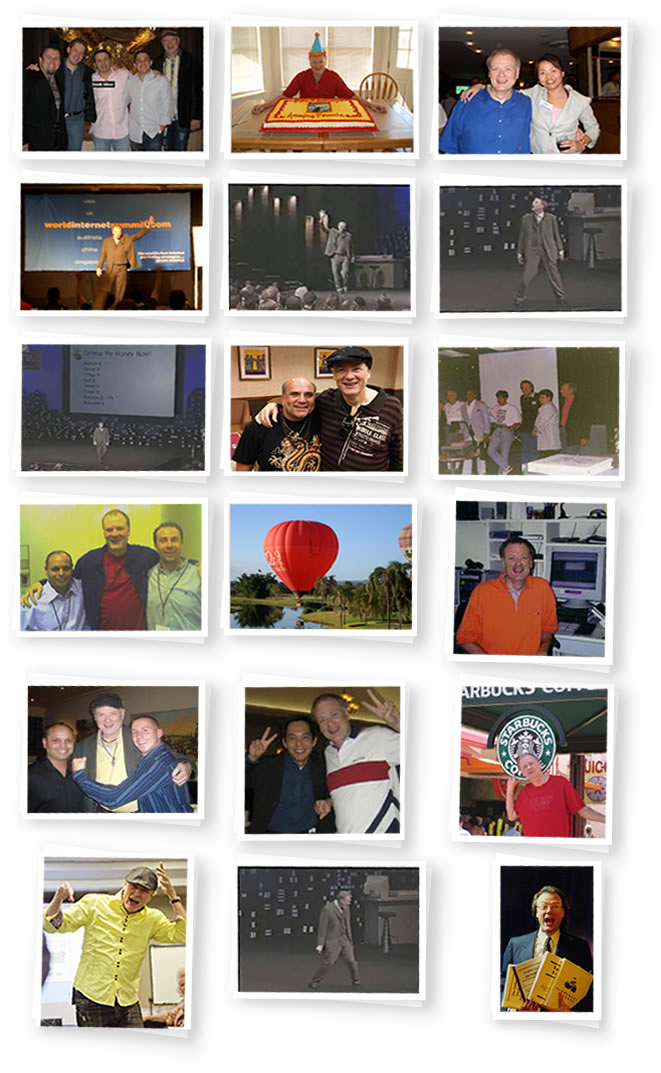
You can see full credibility, including photos from around the world, videos and more documentation on my personal blog at marlonsanders.com. Here's a sample:
OVER 100 PAGES OF REAL TESTIMONIALS!
This is the only product in its class (to my knowledge) with over 100 pages of real testimonials from real, live people who actually exist. These are NOT made up.
I can't publish all of those now due to FTC rules, since many go all the way back to 1997. I CAN show you updated testimonials for all my products on my testimonials blog here.
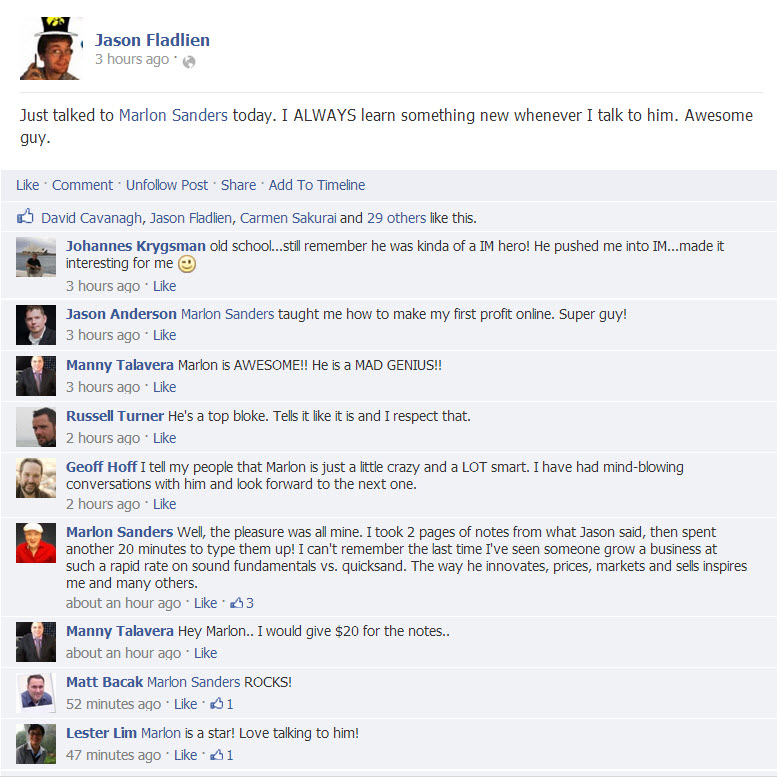
And there are many posts on Facebook like this one:
Or like this:
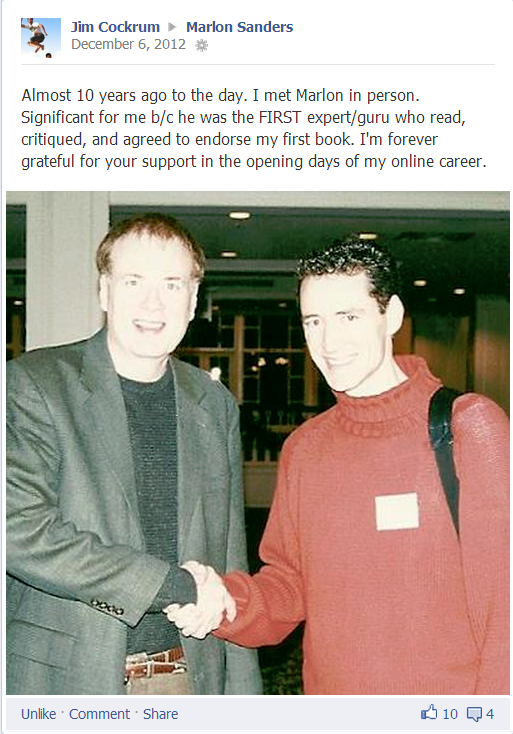
Or like this:
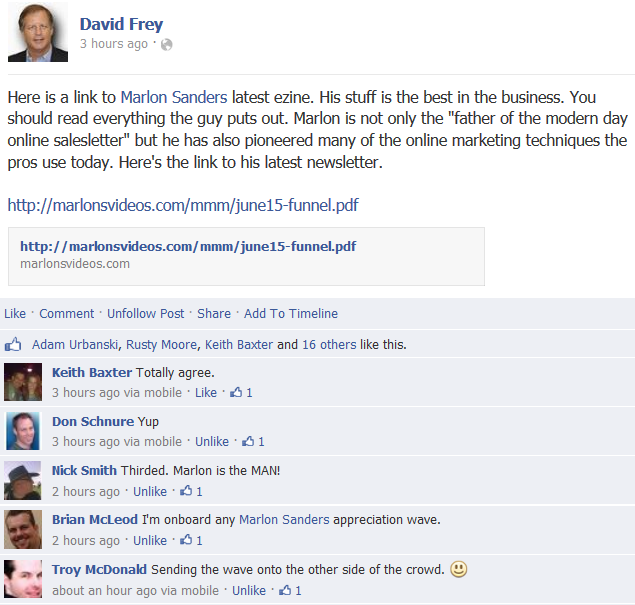
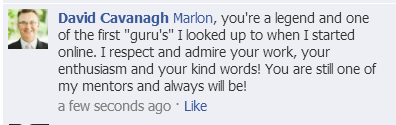
I understand that any yahoo on the net can type up some testimonials and stick them on a page. But I give you my word of honor that these are legit. A few of them don't have last names because I haven't obtained written permission to use their comments. They just zipped me emails to say thanks, and I've reprinted them online for you.
In a second, I'm going to explain my crazy formula.
But first, read these . . .
LET ME SAY THIS
I lose orders to some of my competitors because I don't make outrageous claims. (In fact, I have a page of legal disclosures: legalstuff.html). But I'm hoping you're savvy to understand that claims like these are totally bogus.
My EARNINGS disclosure showing average earnings of my customers and ezine subscribers is located here.
Fact: Many (and perhaps most) of my testimonials are from buyers who are not resellers nor friends. Thus, they don't have a hidden motive for endorsing my product. It's just their honest opinion.
People sometimes ask me: "Marlon, aren't those testimonials just made up?" Nope. Why make 'em up when I get 2-4 new ones every day? I've got another 100 pages I haven't published. Besides that, in the USA making up testimonials is fraud and you go to jail for it!
HERE'S HOW I'M GOING TO HELP YOU
SELL PRODUCTS LIKE CRAZY!
OK. Let's get down to the good stuff. You've got a product or service or have one in mind or you wouldn't be reading this. The question is, how is the best way for you to sell it?
You can use direct mail. But it's darned expensive. Let's say you rent 5 lists to test. You're going to pay $2,000 to $2,500 just for list rental fees. Then you're going to mail 1,000 letters to each list as a test. That costs you $500 per list -- bare bones minimum. So now you're out another $2,500.
You're into the deal $5,000 and your product may bomb! You may lose your shirt. In fact, my research shows only 1 out of 7 direct mail projects is a winner. Don't get me wrong, you can make big bucks with direct mail. But that isn't what my formula is about
IN THIS INFORMATION, YOU WILL FIND OUT
| The simple system a friend of mine used to build a multi-million dollar business and then cash out for bookoo bucks. What it has to do with my formula. |
| Actual examples of multi-million dollar online businesses using variations of my formula. How it's done in the real world. |
| Automating your web site, order taking, product fulfillment and follow up. What no one else is telling you is that even with that, they're STILL working 14-hour days! Why? I'll tell you. |
| Need a merchant account? There's one company most all "gurus" use for a very good reason. |
| 690 leads a day online. A friend of mine does this for just one of his clients and I was shocked how simple it is when he hopped onto gotomeeting and actually took me deep on the INSIDE of the site where he works his magic. I'll tell all. |
| How one of my friends built a multi-million dollar business using dirt-cheap direct mail. (An interesting twist on my formula you may want to try.) |
AND THAT'S JUST THE BEGINNING.
THERE IS MUCH MORE:
- Secrets you can take to the bank.
- You've tried free-for-all links sites, free classified ads, safelists, traffic exchanges, surf sites, some paid ads, you've used submitted your pages to all 1233 search engines and used the bulletin board thingy jigger to pound out your URL. You've sent off articles to ezines and posted in forums. When do the good times roll? Where's the traffic? Where's the money? How come there's trouble in paradise?
- Doing your web pages in html. What tool should you use? What do almost all the pros use? The truth almost makes me laugh my tail end off.
- My friend who did this barter deal for a particular email service for free advertising on extremely high profile web sites. His ads were all over one enormously popular web site. He told me he got 10,000 hits a day with this method! He saved TONS on advertising costs. I tell you the secret behind his incredible response rate. For $250 you can use his method. This has NOTHING to do with spam, by the way. Relax, it's totally above board and in high demand. He told me about this quite awhile ago. I bet he's moved on and the door is still wide open for an enterprising individual.
- Multi-step marketing: What works and what doesn't. Why?
- The Ideal Business: How to turn what you know into cash. Speaking. Writing. Information products. Secrets you should know.
- What are the secrets behind the people who have million dollar home-based businesses? Here's what I've found out from people I know personally. By the way, I do very well. But being a millionaire isn't my focus. I'd rather be on the beach in Bermuda or hanging out in London, as I will soon.
- What to do tomorrow morning to begin selling your products like crazy.
- How to ratchet up the formula using free publicity, multi-step postcard campaigns, multi-step campaigns, and no spam email marketing.
- Why you can be too smart for your own good. The way to get the sales you want and the profits you need even if you're a dummy.
- What to do when you work your tail end off on a marketing promotion and it bombs. My killer trouble shooting chart. Just follow the steps to success.
- Can you really make money like they say by placing a little classified ad in a newspaper and then buying ads in more and more and more papers? The truth will shock you!
- Would you like to get 1,000 referrals at a time? Everybody knows referrals are the best source of new business bar none. But normally they just trickle in. I know one marketer who uses virtually this one marketing strategy alone and hauls in millions. True story.
- What you need to know about using direct mail.
- How to get rid of "your price is too high."
- My famous "Scruffy" method for overcoming sales resistance and getting people to buy today.
- Why I deliver mostly digital products. Should you sell ebooks, cd's or something else?
- How the formula works in both online and off-line environments.
- Secrets of ad copy that sucks up cash like a Twister on steroids! There are a lot of well-intentioned people on the Net who sell information on how to write ad copy. Fine and dandy. But they've never written for a client before. Not once. I get paid as much as $12,000 in 3 days to write. I'll tell you what really works in simple language you can understand.
- I have a master's degree in psychology. I use all kinds of psychology when I craft my letters that soak up cash like wild. I take you deep on the inside and reveal secret strategy you won't hear or read anyplace else.
- Newbie introduction to a super cool program that automates all your follow up for you. People fill out forms at your web site. Zap. The data goes automatically into a database. Boom. Your sales letters zip out without you ever raising a finger! A true thing of beauty!
- After putting up your web site, your first inclination is to get listed at the top of the search engines. You learn about titles, meta tags and all the normal blah, blah information proliferated in every blog on the planet. You try it and you come up 9,999,999 on Google with NO mention in Yahoo or MSN. What's a marketer to do? I know the top search engine gurus on the planet, and I'll tell you the truth no one dares to.
- A woman I know works from home, spends only $1,000 a year on advertising and sells a very healthy six figures plus of her products using her unique spin on my formula. Oh, did I mention? She does this while taking care of her kids and hubby. What's her secret marketing method? Could this be your "missing link?"
- Are you looking for a terrific product to sell that won't die? How about this? I found out about a guy who started a very specific kind of mail-order business. He thrived during the worst economic time of the last 100 years! It's evergreen and tailor made for the net.
- A down-and-out insurance salesperson changes tactics. One crucial discovery gives him a billion in sales. He ends up buying the company he was working for. How I installed his system into my formula.
- An ex-computer salesman in California applied my formula with a genius twist and developed an incredibly thriving online business. Find out about the ummmph he added and how you can use it too.
- New ways to send your traffic through the roof. I'm NOT talking about the same old rehashed, regurgitated search engine stuff. These are new and different.
- How to develop new products, back-end profit centers, lead generators and repeat business money machines in only hours.
- Where to spend a limited advertising budget. What NOT to waste money on.
- A complete, step-by-step explanation of my crazy formula. Why it's different from what most people do.
- How to track ALL your advertising results. I'm talking actual dollars generated. Not just hits. This is the real secret of advertising. Most people have no clue how much revenue an ad actually generates. Now, can know for sure. Every time. To the penny.
- Think webinars are a waste of time and money? Then you should hear about what this guy did just LAST WEEK to make 190 sales at premium prices with ONE webinar -- in the middle of a freaking recession.
- A very clever strategy to use if you aren't getting enough traffic to your web site. It has nothing to do with "mirror pages" "metatags" or goofball free-for-all links spamming. This is a simple, practical, common sense strategy. But almost no one understands or uses it.
- What you must do to get people to fork over money online. The good news is anyone with a few bucks can stick up a web site. The bad news, anyone with a few bucks can stick up a web site. That means you gotta be smarter than the next guy or gal to get people to buy from you instead of them. What you need is a secret psychological weapon. I'll tell you about one so slick it'll blow your mind. And you don't have to worry about your competitors ever figuring it out!
- Should you sell a bunch of products or only one?
- What to do if you don't have any of your own products? Can you really build a profitable income selling products by others?
- The spam controversy. What nobody has the guts to say.
- Why Johnny can't sell his way out of a wet paper bag.
- The stupid-simple application of my formula one marketer used to sell tear gas like it was candy at a kid's convention!
- How to keep from losing your shirt on dog product ideas and promotions.
- Wanna know something that fascinates me? When I talk to people on the phone, you'd think I'd get a lot of questions about "What can I do to make more money tomorrow morning." That kind of thing. But do you want to know the one question I get more than anything else does? "Marlon, can you really do it? Can you really make money on the computer with a home-based business? Can you really sell products like crazy with your formula? Or is all this just a bunch of hype?" I answer those questions for you.
- You've heard that 95% of web sites aren't making money on the Internet. Right? Guess what? That's totally false and misleading information designed to scare you into buying a how to product. The truth is, the average web site generates an astounding profit figure. Here are the facts from the best Internet research company in the U.S.
- How do you determine the optimal price points for your products? Are you selling way too cheap? Did you know you could often increase sales by raising your prices?
- If you're having problems selling what you're selling, it's probably because you're selling the wrong thing to the wrong folks. Sometimes just a twist or two can shake loose the money like crazy. Here's how to shake, jiggle and jolt your money tree.
- Why only 2% of online marketers have over 500 on their subscriber list according to a leading company in the field. I can show you how to beat the averages with the right secrets.
- How to get your web site design done for a fraction of the cost (and I'm NOT talking about using an amateur at your local college).
- And much more...
HERE IS JUST A FEW...

There are so many scammers and rip-off artists online, I thought it'd be helpful if I presented a few criteria to help you only invest your dollars in stuff that's going to give you a great big bang for your buck:
1. If you are buying a product on a WSO or JV Zoo offer be aware that sometimes those products are ghost written
As I mentioned, I had a celebrated marketing career prior to ever selling this product. Also, I wrote this program with my own keyboard. The information is ALL mine. Did you know that not all "experts" write their own programs? They pay a "ghostwriter" to do it for them! Rumor? All I know is I wrote the Amazing Formula myself. It's my own formula. Not someone else's. Thank you very much.
2. Before you hop on that $7 cheap report like a flea onto a junk yard dog, think about this....
That $7.00 report might seem like the bargain of a lifetime. But the costliest information you'll ever buy is MIS-information. Are you going to trust your time, money and future to someone who has been doing this full time for 5 years or less? I've been doing this full time since 1997. Like I said before, I found out a lot of times those reports aren''t even written by the marketer.
3. Do NOT buy products from sales letters that promise or guarantee specific dollar amounts or imply it's highly likely you'll earn that much -- especially if they say it only takes 5 clicks or is easy and anyone without training can do it.
For example, don't buy packages that say they'll make you $1,000 a week, $10,000 a month, $X next year, etc. Those claims are obviously bogus. The person has never met you. For all they know, you're Charles Manson. How can they claim you'll make a dime.
Now, I do have a few friends who sell good products that make claims like this (much to my dismay). But as a general rule, avoid all such offers. I cannot and do not suggest you'll make even a dime with what I offer. I do have a strong moneyback guarantee. But it isn't based on how much money you do or don't make.
By the way, the law says that if you make such claims, they have to be representative of what the average person does who buys the product, unless you clearly state otherwise. Well, the truth is,the average person who buys a "how to" information product doesn't even read it! So you can see why making claims is dangerous. This is why I usually have a full page of legal disclaimers on my products.
You should also know that the same thing applies to testimonials. You'll notice that on my testimonials I always state that they aren't meant to represent what the average person does.
4. Be very cautious about buying someone who emails you ever day or two with a brand new product offer, especially if they don't even know the author or creator of the product
If someone sends you a new offer every day or every several days, chances are they haven't even bought it and don't know the author. In other words, they're promoting it because of some reason other than the product itself.
5. If you're looking for a simple way to make $500 a week online -- in 20 minutes to an hour a night -- without having to learn a lot, feast those eyes of yours on this before you get hung out to dry
Fact: If there were an easy way to make $500 a week in 20 minutes a night just by following some simple instructions and not learning much, don't you reckon everyone in the world working at jobs 8 hours a day for less than that would be doing it? Which would also mean it'd stop working in a New York minute.
The real acid test is the ability to actually get results. Read my testimonials and form your own well-reasoned conclusion.
How My Product Is Priced and Why My Customer Survey Knocked Me Off My Chair
I did a survey of my customers.
I found out that my average household has a $75,000 income minimum. Not bad. Most are college graduates. A few more males than females.
But I also found out that some of my customers told me they don't want to pay more than $30 for any new product I come out with. I have to tell you, I'm shocked! Totally shocked.
I'll tell you right upfront: I'm NOT going to lay out my best information that has cost me a fortune in time and dollars to uncover for virtually nothing. Truth is, you get what you pay for.
You don't know this. But I get paid $1,000 an hour for consulting. Not a lot. But I do get paid that. No bull. Why? Because for the people I work with, I should be able to make them many times more than that by strategizing with them.
I figure I have at least a $5,000 of my time in this (I'm a fast writer). My price isn't cheap but it's extremely fair. It's $37.00. Just one or two extra sales and you pay for it.
If that isn't fair, I don't know what is.
You Can't Lose
Triple Your Money Back Guarantee
OK. Pay attention to this part: Get my product. Read it and TRY IT OUT. If you aren't thrilled with the results anytime within the first 365 days, I'm going to give you TRIPLE your money back.
All I ask is that you try out my simple, easy formula and give it a shot. Just give it a fair effort. If you aren't very satisfied with your results, I don't want your money. Furthermore, I'm going to give you triple your money back, which is $201. Just show me you tried my formula as presented, and I'll give you triple-your-money back.
I'm the first person I know to dare to do this with a digital product. The only reason I can do it is because I'm supremely confident you're going to fall in love with my down-to-earth formula.
Of course, we also provide a standard, 100%, one year moneyback guarantee. But don't worry. IF you actually USE the formula, I dare say you won't be wanting your money back.
What's more, if you order by immediately, I'll make SURE you get 8 incredible bonuses.
First, you'll notice there are several free bonuses I'm NOT offering:
For example, I'm NOT offering 4 million dollars of exaggerated, over-inflated bonuses that are private label rights someone bought for 20 bucks. These bonuses have REAL value.
I'm NOT offering reprint rights to 12, 50 or 100 reports you can resell. Why am I not offering this? Because you know and I both know that those reports are almost never commercially viable products. If they were worth a lot, would people be giving them away? Would they really turn down the extra sales?
If you need products or reports to sell, you can create them in a few hours using my methods anyway.
I'm NOT going to send you a book filled with products you can buy at discounts and resell. That's crazy. You really think you're going to make any money off a laundry list of products? If you do, I have some land in Florida for you ... But if you're looking for a product to sell, in my course, I do tell you the one right way to get one.
I'm NOT giving you access to some secret forum where people without lives go to bicker and argue all the time and rarely exchange useful ideas. But in my course I do tell you several extremely useful places you can go for help.
I'm NOT giving you a diskette with 1 million names you can spam and get clobbered in return. I'm NOT giving you a diskette with 7,000 outdated media contacts that don't match your target market. I'm NOT giving you several diskettes with 2k of links on each. (What a marketing gimmick). I'm NOT giving you shareware programs on diskettes that you can download free anyway off the Net.
Here's what I am giving you.
TAKE ACTION RIGHT NOW
AND GET COOL BONUSES!
BONUS ONE
Access to several SECRET unnanounced bonuses you'll love.
There are a few things I'm keeping SECRET. You'll love these bonuses though.
BONUS TWO
You get reprint rights to my first-class report called The Money Secret: How I make an cash bonus almost anytime I want in only a few hours via Internet marketing.
Discover my simple but powerful method most people either overlook or don't properly execute. Of course, as you know, I'm not guaranteeing you will duplicate my results, nor that they are average. But you CAN offer this report as a bonus with your product. You can sell it. You can give it as a freebie when people sign up for your ezine or mailing list. Or, if you take advantage of bonus eight, you add your reseller link in the resource box at the end and make money by giving it away. We supply ads and a killer banner.!
BONUS THREE
The rights to resell this product for a 60% profit. That's correct. Purchasing this product at retail entitles you to resell it for a 60% profit. Who else gives you a whopping 60% profit on an associates program? But I figure, I can either spend money on advertising or give it to my customers. Two sales and you're already in the green.
It's easy to order my product. Just click the link below. You can download The Amazing Formula digital product on the spot. Note: If you have Web TV, you cannot download the product. You must use a friend's computer.
BONUS FOUR
A 30-day free trial of a software program that lets you launch your own business in one hour.
At last there is a software program that does practically everything for you.
It keeps you from getting bogged down in technology and lets you focus on marketing your product and making money.
This amazing program:
1. Takes orders for you
2. Sends a series of follow up emails to customers
3. Signs up people to resell products for you
4. Tracks associate orders
5. Drops new associates in an autoresponder series
6. Gives you unlimited autoresponder sequences
7. Has built-in ad tracking software
8. Processes credit card orders in real time
9. Manages your mailing list for you
10. Sends out surveys and puts answers in a database
11. Much, much more
12. Allows you to move your whole business to a new ISP in a flash
Before this program, automating an entire business took weeks or months. You had to hire a programmer and so forth. It was tough to integrate autoresponders, your associate program, real time credit card processing, a list serve and a shopping cart.
This program does it all for you. Best of all, it'll cost you less than several sequential autoresponders. And it'll save you a ton of time in trying to put all these systems together.
You get a 30-day free trial. The cost to purchase depends on the features you want.
BONUS FIVE
How to Get Visitors To Your Website Within 3 Minutes For $7, so you can test and try out all your ideas at lightning speed.
How to get traffic to your website within 2 minutes. You get a complet 3 /12 hour video training on this method.
This is your virtual laboratory where you get to try out your ideas and get visitors to your web page within only minutes to see if your idea flies or not. The traffic isn't real targeted but I explain how and why to parlay this into bigger, better things.
NEW GIFT JUST ADDED
As part of the marketing test for this sales letter, I'm creating a new video GIFT that reveals:
* 6 sources of income
* 7 marketing methods
* Passive, residual income formula that brings me $3500 to $7500 per month
* New, revolutionary marketing methods that are state-of-the-art
* How I outsource most of my "work" to the Philippines, and you can too
It'll arrive within 30 days of your order to give you time to first absorb the basic Formula and get it into action. This new information and strategies is the icing on the cake to take things to the NEXT level going into 2010 and beyond.
It's yours as a GIFT when you respond right away but may be withdrawn at any time.
I Guarantee The Amazing Formula
Will Sell Your Products Like Crazy
-- Or Triple Your Money Back!
The Amazing Formula is backed by a ONE YEAR, 100% customer satisfaction guarantee which means that you can return it, in the unlikely event it does not work for you. No questions asked.
Alternately, if you follow the formula as presented and find it didn't work for you, then you have 1 year to ask for a TRIPLE YOUR MONEY BACK refund.
If you're unhappy with the product for any reason, just go here within 60 days and let me know. The only reason I make this guarantee is I'm very confident you'll love the training and refer to it for years to come like my other customers do. |
|

|
That's My Own Personal Guarantee!
|

Get Everything TODAY For Only
$37.00
You'll get INSTANT ACCESS to the Amazing Formula To take advantage of this Amazing Formula offer before it's withdrawn just click the "Add to Cart" button below. Payment can be made using any major credit card, e-check, or from your PayPal account balance. (You do not need a PayPal account to order.) |


PS: Click here ONLY if you've decided not to ORDER RIGHT NOW.
PPS: NEW GIFT just added.
As part of the marketing test for this sales letter,
I'm creating a new video GIFT that reveals:
* 6 sources of income
* 7 marketing methods
* Passive, residual income formula that brings me $3500 to $7500 per month
* New, revolutionary marketing methods that are state-of-the-art
* How I outsource most of my "work" to the Philippines, and you can too
It'll arrive within 30 days of your order to give you time to first absorb the basic Formula and get it into action. This new information and strategies is the icing on the cake to take things to the NEXT level going into 2010 and beyond.
It's yours as a GIFT when you respond right away but may be withdrawn at any time.
CUSTOMER COMMENTS

|
"...enabled me to take my first ever ebook to the top of the charts!" | |
"Thanks for a great product, a willing ear, and being a marketer with honor, integrity, and a work ethic that has launched what I am sure are thousands of marketing careers!" |
Marlon is a MASTER at eliminating fluff and giving you the most relevant information you need. His Amazing Formula should really be called The Unbelievable Simple Applicable Formula because that is what it really is. Thank you for the formula that has enabled me to take my first ever ebook to the top of the charts! Paul Polanco, |
Marlon, I want to thank you again for being the inspiration for my internet career. I read "The Amazing Formula" in 1999 and went on to build the largest grant information business on the web. I owe you a lot and to think, I almost used that money to do something as trivial as pay my phone bill, perish the thought! Seriously, Thanks for a great product, a willing ear, and being a marketer with honor, integrity, and a work ethic that has launched what I am sure are thousands of marketing careers! Tom Bell |
||
|
|
"I haven't had much success with internet marketing and was getting discouraged." |
|
"Marlon's easy to follow programs are packed to the brim with solid, non-fluffy, hard hitting information" |
After I read The Amazing Formula I started to get excited. It is straight forward and easy to understand... Allen Irwin |
Marlon is an absolute genius! He flawlessly combines knowledge and motivation to give you an unbeatable package that will literally make you an online superstar! I've spent over $6,000 dollars on websites alone and they are not profitable to say the least... I didn't know I was getting short changed in so many ways, that is until Marlon came along. Marlon's easy to follow programs are packed to the brim with solid, non-fluffy, hard hitting information. And he has tied in the crux of human psychology into everything that he had done. With Marlon, motivation is not a problem, skill is not a problem, the only problem you will have is learning the hard way if you don't go Marlon's way! The message is simple, if you want SUCCESS NOW then you need Marlon. If you want SUCCESS EASIER! Then you need Marlon. Hoe Bing Lo,
|
||
|
|
"The product lived up to all its claims..." | |
"I'm red-hot pleased and super-satisfied..." |
For a no nonsense approach with all the answers you'll ever need, this product is a "best buy"! The product lived up to all its claims and pointed me in the right direction... it's great. Great job Marlon!
|
Marlon! Your product is all meat and no fat! You really know how to cut to the chase! Gary Pajor
|
||
|
|
"Marlon Sanders does a great job minimizing the hype" | |
"I am with a division of Procter and Gamble and still use the principles I learned from Marlon..." |
He puts it right out there in plain, simple English. He makes it clear that the biggest obstacle to making serious money is the fact that most of us will take NO action. But if you take action on the program he lays out, you will make serious money. But if you sit at home, wondering if this thing is any good, you'll be missing out on a solid formula that has absolutely been proven successful. Blair Hornbuckle
|
Marlon Sanders is one of the most generous and amazing human beings I have ever had the privilege to meet in my life. I met Marlon when he was just getting started out and let me tell you this guy has a passion for what he does! Marlon is a true gift and everyone can learn a lot from him. I read the "Amazing Formula" and it helped me to become a successful marketer in dot com's. Now I am with a division of Procter and Gamble ® and still use the principles that I learned from Marlon Sanders. Kelli Reedus
|
||
|
|
"I've learned so much from you, that I've shaved years off my learning curve!" |
|
"...reading his courses gives you not only the knowledge but also energy to take action." |
Marlon, you always seem to be a few giant steps ahead of everyone else. It's uncanny. Your intuitive Internet marketing products and superb affiliate program make you the leader of the pack. I've learned so much from you, that I've shaved years off my learning curve. You're an inspiration to marketers everywhere. Rick De Lima
|
Marlon's products are some of the best available to you on the net if you want to learn online marketing. And reading his courses gives you not only the knowledge but also energy to take action. Gian Luigi Ruggeri
|
||
|
|
"What They're Buying I'm Selling!" | ||
Marlon, I'll never forget your awesome live presentation at Ted Ciuba's event at the Opryland Hotel. Thanks to you, these words have been forever branded on my brain: "What They're Buying I'm Selling!" Steve Boutelle
|
|
||